 Celebrate with up to 80% off
Third-party vs. first-party cookies: What’s the difference and why does it matter?


First and third-party cookies are different ways websites store and access data in your web browser.
First-party cookies are set and used by the website you visit, while third-party cookies come from external services and are more likely to affect your privacy.
In this article, we explore the differences between third and first-party cookies, how they work, how they enable online tracking, and how user consent can influence data collection.
What are cookies and why do websites use them?
Cookies are small data files set by websites and stored by your web browser. They store information about your activity or session, such as login details, user preferences, and settings like your selected language.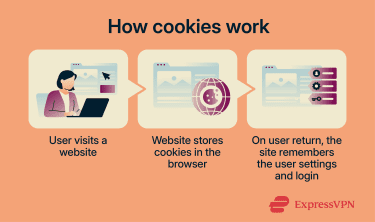
They can be grouped based on their purpose:
- Necessary cookies: Support core site functions, such as remembering whether you’ve given consent for cookies. Strictly necessary cookies are usually exempt from consent requirements because they are needed to provide a service the user requested. Users can still block cookies in their browser, but doing so may cause parts of a site to stop working.
- Preference cookies: Allow sites to remember your preferences (like language or region) to create a more personalized experience for your next visit. Preference cookies can be either session-based or persistent, depending on how the site is configured.
- Analytics cookies: Track website visits, traffic sources, and whether you’re a new visitor and use this information to analyze the site’s performance.
- Marketing cookies: Use unique identifiers to collect data on your behavior, interactions, and commercial interests, and serve you marketing ads. Platforms like LinkedIn or YouTube use these cookies to select relevant advertisements or track content preferences.
In many jurisdictions (especially in the EU and U.K.) websites need consent before using non-essential cookies. The only exception is strictly necessary cookies, which are required for the service to function.
Websites usually obtain this consent through cookie banners, where users can typically accept, decline, or manage their preferences.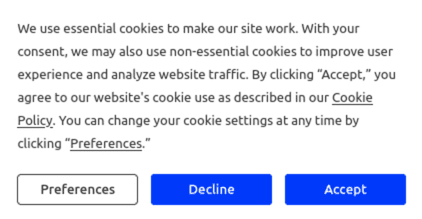
What are first-party cookies?
First-party cookies are set by the website you visit and are accessible only to that site. They’re often essential for core site functionality but may support features like analytics and personalization.
First-party cookies can:
- Keep you logged in between visits.
- Save items in your cart for your next visit.
- Recommend content based on activity on the site.
They help improve your experience by remembering preferences and tailoring content based on recent activity.
What are third-party cookies?
Third-party cookies aren’t created by the website you visit, and they’re generally considered non-essential to your overall experience. Third-party services like ad networks and analytics providers create them and store them in your browser.
They’re commonly used to track activity across different websites. This includes your interactions with different websites and inferred interests. This is used to deliver personalized ads from external providers, which may appear across multiple sites instead of a single one.
Third-party cookies are also used in tools like social media plugins, which track how users interact with their services. These cookies can link browser activity, social media accounts, and on-site interactions into a single tracking profile, which is used to personalize content, measure engagement, and deliver targeted ads.
Analytics providers can track how users interact with websites across different platforms, too. Ad retargeting services can recognize your browser across multiple sites and use that activity to display relevant ads.
Other third-party services, such as embedded video players, chat widgets, or payment processors, may also use third-party cookies to support their functionality.
Third-party vs. first-party cookies: Key differences
| First-party cookies | Third-party cookies | |
| Who creates them? | The website you visit | Another website, such as an ad network |
| Who can access them? | Only the website you visit | The third-party domain that sets them |
| Where are they used? | The domain of the website that set them | On every website using the third-party cookie code |
| What do they track? | User activity within the site to improve experience and provide core services | User activity across multiple sites, for marketing purposes, such as delivering personalized ads |
| Can you reject them? | You can block some first-party cookies, but many sites won’t work without them | You can block third-party cookies in most browsers, and it won’t typically affect site performance |
| Are they essential? | Some are essential for site functionality, while others support analytics or personalization | Generally not essential for core site functionality and often used for advertising |
| How long do they last? | Can be short-lived (session-based) or persistent | Often persistent, which allows tracking across sessions and sites |
| What’s their privacy impact? | Typically lower when used for site functionality. | Higher privacy impact due to cross-site tracking |
| Do browsers support them? | Yes, all browsers support first-party cookies | Many browsers restrict or block third-party cookies by default |
Why third-party cookies are being phased out
Third-party cookies are being phased out mainly due to privacy issues. They allow companies to track users across multiple websites, often without clear visibility or control, raising concerns about how personal data is collected, shared, and used.
Certain web browsers, such as Safari and Firefox, have started restricting or blocking third-party cookies in response to these concerns.
On the other hand, Google announced plans in 2020 to gradually phase out third-party cookies in Google Chrome but later said it would keep its current approach and would not introduce a new standalone third-party cookie prompt. Chrome still lets users manage cookies in settings, and Incognito blocks them by default.
What’s replacing third-party cookies?
Even though third-party cookies aren’t completely deprecated, companies have begun looking for alternatives that rely less on cross-site tracking:
- First-party data strategies: Data collected directly from users, with clearer consent for non-essential data. This includes newsletter sign-ups, where users provide details like email addresses, as well as interactions such as opens or clicks. Surveys, gated content, and interactive features also help gather data without relying on third parties.
- Server-side tagging: With server-side tagging, data isn’t sent directly from the browser to third parties. Instead, it’s first sent to the website’s server, which can control what is shared and only pass on data after user consent is obtained.
- Unified ID 2.0: This assigns a shared identifier based on a user’s anonymized email address. It allows advertisers to deliver relevant ads without relying on traditional third-party cookies, while giving users more visibility and control over how their data is used.
- Contextual advertising: Ads are matched to the content of the page a user is viewing, rather than their past behavior. This avoids cross-site tracking and personal identifiers, helping preserve user privacy while still allowing for relevant advertising.
The impact of privacy laws on cookies
Privacy laws changed how websites and users approach cookies in stages. In 2002, Europe introduced the ePrivacy Directive (Directive 2002/58/EC), which set privacy rules for electronic communications. Then, in 2009, the law was updated to require websites to get consent before storing or accessing information on a user’s device in many cases. That shift is a big reason cookie banners started appearing everywhere: websites could no longer quietly drop tracking cookies without first telling users and, in many cases, getting permission.
The next big turning point came in 2018, when the General Data Protection Regulation (GDPR) became applicable across the EU. GDPR did not create the cookie rules themselves, but it raised the standard for consent and transparency when cookie data could identify a person or be linked to them. In practice, that meant websites had to be clearer about what cookies they used, why they used them, and how people could say no. It also pushed companies to rethink vague banners and buried disclosures, because consent had to be meaningful, informed, and easier to withdraw.
In the U.S., the legal pressure came later and looked a bit different. The California Consumer Privacy Act (CCPA), which took effect in 2020, gave Californians the right to know what personal information businesses collect and to opt out of certain data sales. Then, in 2023, the California Privacy Rights Act (CPRA) amendments took effect, expanding those rules and adding stronger protections around the sharing of personal information. That did not create a Europe-style cookie consent regime across the whole U.S., but it did push many businesses to offer more visible privacy controls, especially around advertising and cross-site tracking.
Today, the result is that cookies are no longer just a technical website tool. They are now a legal and compliance issue too. What started as a simple way to remember logins or shopping carts has become something regulators closely examine when it is used for profiling, ad targeting, or tracking people across the web.
Do second-party cookies exist?
Second-party cookies exist, but they aren’t a distinct technical type of cookie. The term refers to how first-party data is shared between trusted partners. Here’s how the process works: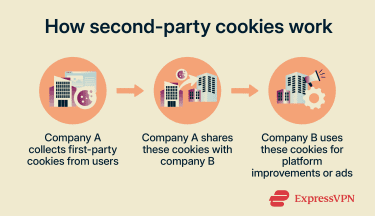
Second-party cookies are valuable to companies for several key reasons:
- They give businesses data about customers that they may not have been able to obtain otherwise. They can use this data to improve their services, create more targeted ads, or deliver more personalized content to their target audience.
- They tend to be more reliable than third-party cookies collected by an ad network or tracking company, as they come directly from a first-party company.
- They can be easier to use by companies, as the first-party collector typically organizes and makes them ready to use before sharing them.
How to manage cookies
Managing cookies can improve privacy by giving more control over data collection.
Our guide on third-party cookies goes into detail about how to block them by browser, but beyond browser settings, there are also other ways to limit tracking and improve privacy. Many sites you visit will ask for your consent before collecting cookies. That’s where you can choose to allow or reject data collection.
If a “Reject all” option isn’t available, you can usually select a “Manage preferences” button, which opens a settings panel or page where cookie choices can be adjusted.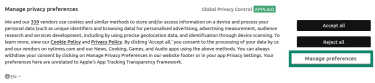
Note that, in some cases, the “Reject” button may be hidden in the preferences menu or made less visually prominent than the “Accept” button.
FAQ: Common questions about first-party vs. third-party cookies
Are first-party cookies safer than third-party cookies?
Can websites work without third-party cookies?
Do cookies collect personal data?
How long do cookies stay in a browser?