Intrusion detection system: Detect threats before they disrupt your network



When responding to cybersecurity incidents, time can be an important factor. Spotting suspicious activity early may help security teams investigate faster and limit the impact of an attack. Intrusion detection systems (IDS) support this process by helping teams identify potential threats sooner and respond before incidents spread further.
What is an intrusion detection system?
An IDS is a security tool that analyzes network or system activity for signs of possible incidents, such as unauthorized access attempts, malware activity, or security policy violations. Unlike an intrusion prevention system (IPS), a traditional IDS typically doesn't block threats on its own. Instead, it alerts security teams so they can investigate and respond, or it works alongside other security tools that can take preventive action.
How an intrusion detection system works
An IDS works by collecting activity data from relevant sources. It then uses analytical methods, including signature-based and anomaly-based detection, to identify known attack patterns or unusual behavior.
Here’s a more detailed breakdown of the main steps and processes involved in intrusion detection:
Traffic monitoring and log analysis
Traffic monitoring and log analysis are two fundamental IDS processes. Network-based systems can capture and inspect traffic as it moves between devices, while host-based systems can review logs and activity from operating systems, applications, and firewalls. Some deployments use both approaches to provide broader visibility into system and network activity.
Also read: Your comprehensive guide to cyber threat monitoring.
Signature-based detection
This detection method compares observed activity against databases of known attack signatures, such as byte patterns or exploit indicators. These signatures are compiled from information about known malware, exploits, and other threats and are typically updated as new threats emerge.
If the IDS spots signs that match those in the database, it can generate a real-time or near-real-time alert. This method is usually effective at quickly identifying known threats, though it may struggle against new or unknown attack types.
Anomaly-based detection
This detection method involves establishing a baseline of normal system or network behavior. The IDS can then identify activity that deviates from expected patterns, such as unusual user actions, unexpected login behavior, or abnormal traffic volumes.
Anomaly-based detection can help identify previously unknown threats, such as some zero-day activity or unusual insider behavior. However, it may also generate false positives when legitimate activity falls outside the expected baseline.
Hybrid detection methods
Hybrid methods combine signature-based and anomaly-based techniques to broaden detection coverage. A hybrid IDS can use signatures to detect known threats, for example, while also using anomaly-based analysis to detect unusual behavior that may not match an existing signature.
This may help it spot a wider range of threats than an IDS that relies on only one detection method.
Alert generation and prioritization
When a potential threat is detected, a traditional IDS doesn’t usually take direct action to block it. Instead, it generates an alert so the organization’s security team can investigate and respond.
These alerts may include details on which systems are affected, how severe the threat appears to be, the type or nature of the threat, and the time of detection. Many tools also prioritize alerts so teams can focus on the most serious issues first.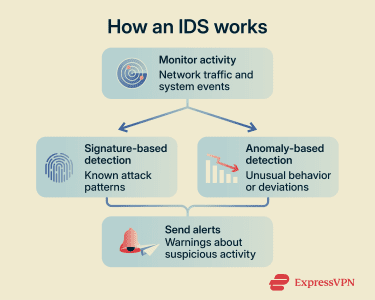
Main types of intrusion detection systems
IDS tools can be classified into different groups based on where they're deployed, what they monitor, and how they detect suspicious activity.
Network intrusion detection system
A network IDS (NIDS) monitors network traffic in the area where it’s deployed. It’s typically placed at strategic points within the network, such as network gateways, perimeter links, or internal segments where traffic can be mirrored or inspected.
NIDS solutions analyze traffic using methods such as signature-based and anomaly-based detection to spot suspicious activity. This type of IDS can provide broad network visibility, though it cannot inspect the contents of encrypted traffic without dedicated Secure Sockets Layer (SSL) / Transport Layer Security (TLS) decryption tools.
Host-based intrusion detection system
A host-based IDS (HIDS) operates on individual devices, such as computers or servers, monitoring internal activity and looking for signs of exploitation or compromise. These systems typically monitor and analyze system logs, file integrity, processes, configuration changes, registry changes on Windows systems, and user activity to detect suspicious signs, such as unauthorized file modifications.
They can detect attacks that might not be visible at a network level, including localized malware infections or suspicious activity by authorized users.
Wireless intrusion detection system
A wireless IDS (WIDS) is designed to monitor Wi-Fi networks and wireless devices for suspicious activity or potential cyberattacks. It achieves this by monitoring wireless traffic and radio frequencies for suspicious packet patterns, unauthorized devices, or known malicious behavior.
A WIDS can be a helpful tool for enforcing wireless security policies and guarding against threats such as rogue access points, denial-of-service (DoS) attacks, and spoofing.
Network behavior analysis intrusion detection system
A network behavior analysis (NBA) IDS monitors overall network traffic patterns for unusual or suspicious behavior that could indicate malware infections, insider misuse, DoS activity, or other cyberattacks. It works by establishing a baseline of normal behavior before looking for deviations from it. It’s similar to an NIDS in that it focuses on network traffic, but it emphasizes behavioral and flow analysis rather than relying mainly on signature matching.
Protocol-based intrusion detection system
A protocol-based IDS (PIDS) monitors and analyzes communication protocols used between systems. This more specialized type of IDS is typically positioned in front of servers, inspecting protocol-specific traffic, like Hypertext Transfer Protocol (HTTP) or File Transfer Protocol (FTP).
It’s most effective at detecting attacks that exploit weaknesses in protocol usage and at spotting suspicious signs such as malformed data packets or unusual protocol sequences.
Application protocol-based intrusion detection system
An application protocol-based IDS (APIDS) monitors interactions between users and applications or application-layer protocols. These IDS tools are specifically designed to understand the structure and typical behavior of applications or services, such as databases, email systems, or web applications, by analyzing requests, responses, and other interactions for signs of malicious activity.
They can be useful for identifying application-level attacks that might bypass broader network monitoring. Like PIDS, APIDS platforms are more specialized compared to NIDS, HIDS, WIDS, and NBA IDS.
Hybrid intrusion detection system
A hybrid system combines two or more IDS technologies, such as NIDS and HIDS, into a single platform or coordinated deployment. This can provide broader security coverage than a single IDS type and support a wider variety of detection methods.
Such tools may improve visibility and correlation by analyzing data from multiple sources, though accuracy and false-positive rates still depend on configuration, tuning, and the quality of the detection rules or baselines.
Common threats an IDS can detect
From unauthorized access attempts to malware activity, IDS solutions can help detect a wide range of digital threats.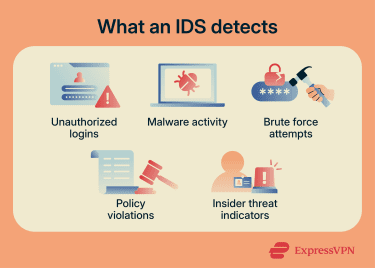
Unauthorized logins
An unauthorized login occurs when someone accesses a device, application, or network without legitimate authorization, including through stolen or misused credentials. IDS platforms can detect unusual authentication patterns, such as repeated failed logins from a user account, access from unfamiliar locations, or system access outside usual working hours.
Malware and suspicious traffic
IDS solutions can inspect data packets, file transfers, and system behavior to detect signs of potential malware infections. They may be able to spot known indicators of viruses, ransomware, spyware, and botnet activities. They can also look for unusual traffic patterns, such as communication with known malicious or suspicious destinations or large, unexplained data transfers, which could indicate possible data breaches and exfiltration.
Brute force attacks
A brute-force attack involves repeated attempts to guess or validate login credentials, often using many password guesses, username-password combinations, or automated login attempts. IDS platforms can spot these attacks by looking for a high number of failed logins within short time spans, repeated access attempts from the same IP address or location, or other unusual authentication behavior.
Policy violations
Organizations typically have strict policies or security rules regarding how their networks and systems should be used. IDS platforms can be configured to reflect these policies and detect violations as and when they occur. For example, host-based IDS tools or integrated endpoint security platforms may alert when unauthorized software is installed or sensitive system files are changed.
Insider threat indicators
Threats don’t always come from outside. Employees, contractors, and other users with internal access to company systems may, intentionally or inadvertently, put those systems at risk. IDS platforms can help surface possible warning signs of insider incidents, often involving unusual behavior patterns, such as users logging in at strange times, downloading large amounts of data, attempting to change permissions, or disabling security tools.
These alerts usually require investigation because unusual behavior can also have legitimate explanations.
Where to place an intrusion detection system
Business networks can be large and complex, with multiple entry points, exit points, and internal segments. That’s why organizations need to place IDS tools in the right locations to maximize visibility and effectiveness.
Network perimeter monitoring
One of the most common locations for an IDS is at the boundary between an internal network and external networks, like the internet, also known as the network perimeter. This allows organizations to monitor traffic crossing that boundary, potentially spotting malicious activity and issuing timely alerts so security teams can investigate and respond.
This method can be helpful for detecting activity such as port scanning and some DoS indicators.
Internal network monitoring
This involves placing IDS solutions within the internal network infrastructure, rather than only at the network’s edge. Internal IDS tools may be positioned between different departments or subnetworks to monitor lateral movement and communications across the larger network.
This may help security teams spot compromised devices, malware activity, or suspicious behavior that has bypassed perimeter defenses.
Cloud environment monitoring
This method involves using IDS solutions within cloud-based infrastructure to detect threats targeting virtual systems, cloud workloads, and online resources. It may not be relevant to organizations that don't use cloud services, but it can be useful for those that rely heavily on cloud computing.
Cloud monitoring tools can help to detect unauthorized logins, possible data exfiltration from cloud storage services, suspicious API requests, and other cloud-related threats. Visibility depends on the service model, cloud provider, logging sources, permissions, and network architecture.
Endpoint and server monitoring
This placement method typically involves installing HIDS agents or tools on individual devices, such as workstations, laptops, and servers. They can then monitor activity on those specific systems, such as application behavior, system logs, file and configuration changes, registry changes on Windows systems, and user actions.
Endpoint monitoring can help detect threats that may not appear immediately in network traffic, such as local malware infections or certain insider threat indicators. However, this can involve additional deployment, tuning, and maintenance for IT teams.
Benefits of using an intrusion detection system
IDS technology is commonly used as part of a broader security monitoring and response strategy. Its benefits include:
Reduced security blind spots
IDS tools can improve visibility by monitoring selected network segments, systems, endpoints, or cloud environments, depending on their deployment. They can spot subtle signs of suspicious activity that may otherwise go unnoticed and monitor areas that might lack direct oversight. Monitoring multiple parts of the environment can reduce gaps in security coverage and give organizations a clearer picture of their infrastructure.
Early threat detection
IDS platforms can help detect potential threats earlier by issuing prompt alerts when suspicious activity appears. This can give security teams valuable time to investigate the issue and contain potential threats, reducing the likelihood of widespread damage, data loss, or compromised systems. This can be particularly useful when dealing with fast-moving attacks, such as worm-like malware or ransomware propagation.
Stronger incident response
In addition to potentially speeding up incident response times, IDS tools can make responses more efficient. They’re able to provide detailed alerts, logs, and contextual data about any suspicious activities they detect. Security teams can use information from their IDS to better understand how and where an attack may be unfolding. This, in turn, can help them make more informed decisions regarding how to contain it and reduce additional risks.
Improved compliance support
Some regulatory frameworks require or recommend network monitoring, intrusion detection, logging, or alerting controls. An IDS can help organizations support those requirements by contributing to monitoring, detection, logging, and audit evidence for various compliance programs, particularly in high-risk industries.
However, an IDS doesn't make an organization compliant on its own. Compliance still depends on correct scope, configuration, documentation, evidence retention, and other required security controls.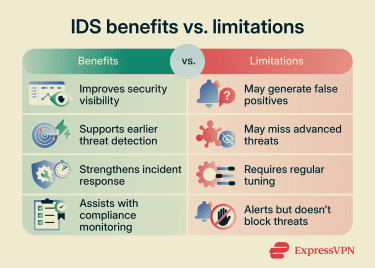
Limitations of intrusion detection systems
Despite their usefulness in identifying suspicious activity and potentially speeding up security responses, IDS platforms also have their limitations, including:
False positive alerts
IDS solutions don’t necessarily achieve perfect accuracy in identifying genuine threats. They may make mistakes and generate security alerts when no threats actually exist, also known as false positives. These can occur for various reasons, such as misconfiguration, unusual but legitimate user behavior, outdated signatures, or overly sensitive detection rules or thresholds. Security teams may waste time responding to these false alerts.
IDS tools can also produce false negatives, where real threats are missed or fail to trigger alerts.
IDS evasion techniques
Attackers may use specific methods to attempt to bypass detection by IDS solutions. Common evasion techniques include:
- Traffic fragmentation: Splitting malicious payloads into smaller pieces.
- Encryption and tunneling: Hiding malicious data in encrypted traffic.
- Packet manipulation: Using malformed packets, unusual headers, or overlapping fragments to confuse inspection
- Slow and low attacks: Extending attacks over long periods to avoid triggering thresholds.
Any of these techniques may reduce the effectiveness of IDS detection.
Resource and maintenance requirements
Some IDS deployments can have relatively high processing, storage, or maintenance requirements. Since they typically operate continuously, they may require substantial resources to analyze large volumes of network traffic, system events, or logs in real time or near real time.
These solutions also need regular updates, tuning, and review to remain effective against new threats. Proper configuration is essential, as misconfigurations can make IDS tools less effective or more likely to generate false positives.
Detection without automatic prevention
Conventional IDS systems are passive security solutions. They can monitor systems and issue alerts about suspicious activity, but they can’t usually stop threats on their own. They lack active prevention capabilities, so security teams still need to respond to alerts promptly and use additional security solutions, such as IPS, firewalls, or endpoint security tools, to block or contain attackers.
FAQ
Can an IDS stop attacks on its own?
How often should IDS rules be updated?
Is an IDS useful for small businesses?
What data should an IDS monitor?
Can an IDS detect threats in encrypted traffic?