
Expressvpn Glossary
Data archiving

What is data archiving?
Data archiving is the process of moving data that organizations no longer use in daily operations to a separate storage system for long-term retention. Archived data usually consists of records that need to be retained for legal, regulatory, or historical purposes.
How does data archiving work?
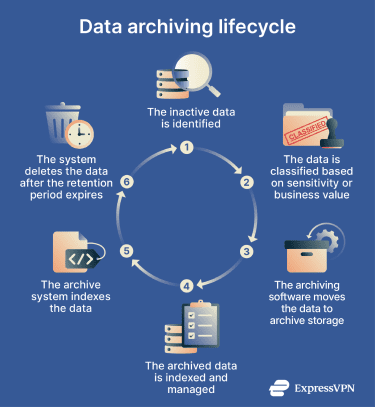
Data archiving usually follows a structured lifecycle. Typical steps include:
- Identification: IT teams identify data that no longer supports daily operations but still requires retention.
- Classification: Systems categorize the data based on type, sensitivity, or compliance requirements.
- Migration: Tools move the selected data from primary storage to an archive platform.
- Indexing: The archive system creates metadata and indexes to allow efficient searching and retrieval.
- Retention management: Policies define how long the organization keeps archived data before deletion.
Data archiving methods
Organizations use several different methods for archiving data, depending on their infrastructure and compliance requirements. Common methods include:
- Cloud archiving: Data is stored in long-term cloud storage tiers designed for durability and lower costs.
- Disk-based archiving: Archived data is stored on hard drives or solid-state storage systems for faster retrieval.
- File system archiving: Files from servers or storage systems are moved to archive repositories.
- Tape archiving: Magnetic tape remains a common option for large-scale long-term storage.
Benefits of data archiving
Data archiving helps organizations manage large volumes of information while maintaining compliance and security. Key benefits include:
- Regulatory compliance: Many industries are required to retain records to ensure adherence to laws and regulations.
- Reduced storage costs: Moving older data to cheaper storage lowers infrastructure expenses.
- Improved system performance: Production systems run more efficiently when unused data is removed.
- Better incident investigation: Archived logs and records help with analysis during security events or audits.
- Preservation of historical information: Archives maintain long-term records for research or reporting.
Risks and privacy concerns
While archiving protects long-term data, it can also introduce security and privacy risks if not managed properly. Potential issues include:
- Unauthorized access or poor access controls can expose archived records that contain sensitive data.
- Weak encryption that leaves archives vulnerable to theft or data breaches.
- Keeping data longer than necessary increases the impact of potential breaches.
- Metadata or search indexes could reveal sensitive information.
- Vendor lock-in can mean that migrating archived data between platforms is more difficult.
Further reading
- What is big data security and privacy?
- How to back up files and encrypt them
- Wayback Machine cyber attacks: Everything you need to know
- What is data hoarding? Full guide with 5 ways to fix it
- What is data exfiltration? A complete guide